
Local government software: a buyer’s guide for Australian councils
How to decide between replacing a council’s core system and integrating with it. Includes a comparison of the two options, a cost calculator and questions to ask a supplier.

Most Australian councils run a core system for rates, property, finance and regulatory work, usually from TechnologyOne, Civica or Infor. When that system no longer does what the council needs, the council can replace it, or it can keep it and add integrations, portals and online forms around it. This guide explains how to tell which option fits your council, how the costs compare, and what to ask a supplier before you sign a contract.
Accelerate Tech does the second kind of work. We integrate council systems and build portals, application trackers and forms on top of them, and 35+ councils across Australia use parts of what we have built. We do not replace core systems, so the section on replacement names the firms that do.
The systems a council runs
Council software falls into five groups. The table lists what each group holds and the products we see most often in Australian councils.
| Group | What it holds | Common products | Who controls it |
|---|---|---|---|
| Core system | Rates, property, finance and regulatory applications | TechnologyOne, Civica Authority, Infor Pathway | The council and the vendor |
| Records | Documents and correspondence | OpenText Content Manager, SharePoint Online, TechnologyOne ECM | The council |
| State systems | Planning applications and certificates lodged by the public | NSW Planning Portal | The state government |
| Website and portals | Service requests, payments, application tracking and planning rules | Council website, citizen portal, online forms | The council |
| Reporting | Performance and statutory reports | Power BI, spreadsheets | The council |
A council can change its own website or reports whenever it chooses. It can change the core system only with the vendor’s involvement. It has no control over the NSW Planning Portal, which the state updates on its own schedule.
Replacement changes the core system. Integration work changes the two layers above it.
- Websites, portals and reportsCitizen portal, online forms, application tracker, dashboardsIntegration work
- IntegrationsAPIs and connectors that move records between systemsIntegration work
- Core systemRates, property, finance, regulatory and assetsReplacement
- State systemsNSW Planning Portal and other state registersNot changed by either
Replacing the core system
Replacement means moving rates, property, finance and regulatory work to a new product, usually one module at a time. It is the correct choice in three situations:
- The vendor has ended support for the version you run, or has announced the date when it will.
- The system cannot meet a legal or reporting requirement, and the vendor confirms that configuration will not fix it.
- The council runs two core systems for the same function, which can happen after an amalgamation.
Integration work does not solve any of these problems. It can keep an unsupported system in use for longer, but the council will still have to replace it.
TechnologyOne implements its own software. Atturra describes itself as Australia’s largest independent TechnologyOne consultancy, and Lanluas specialises in TechnologyOne OneCouncil.
When you compare replacement quotes, check whether they include your existing integrations. Every interface to the old system has to be rebuilt for the new one, including the connection to the NSW Planning Portal and the records system. Ask each supplier whether the quote covers that work and what it costs.
Keeping the core system and integrating with it
Some councils have a core system that handles rates and finance correctly but is not connected to their other systems. These are the usual signs:
- Staff type the same application or request into two systems.
- Residents phone the council to ask about an application, because the website cannot show its status.
- Staff assemble monthly reports by hand from several systems.
- A state agency changes an interface and the council has to respond by a fixed date.
In these cases the core system can stay. The work is to connect it to the other systems and, where residents are involved, to add a web or mobile front end that uses its data.
Example: the NSW Planning Portal
Since 1 July 2021, every NSW council has had to accept development applications, modification applications and several types of certificate through the NSW Planning Portal. The portal is a state system, so each application also has to be entered into the council’s own system. Without an integration, a planning officer does that by hand. Shellharbour City Council processes around 800 development applications a year and copied each one across manually before it automated the transfer.
The NSW planning department publishes APIs that let a council system receive applications from the portal and send status updates back. There are separate APIs for development applications, complying development certificates, post-consent certificates, building information certificates, Section 10.7 and Section 68 applications, and referrals.
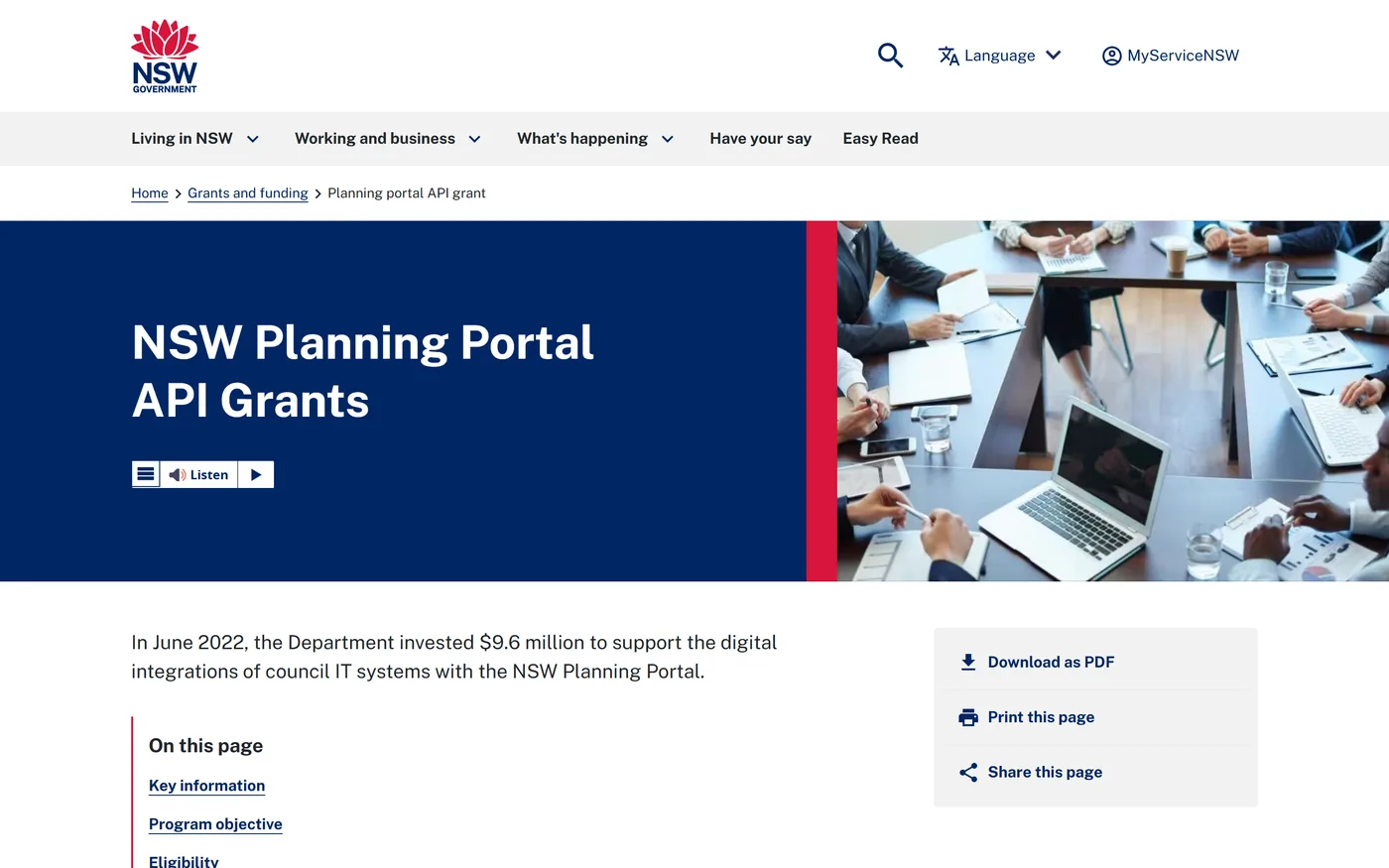
In June 2022 the department funded councils to use these APIs. It invested $9.6 million, paid as grants of $80,000 to each council, and 120 of the 128 NSW councils applied. The grant conditions required each council to connect to the Online DA API by 31 March 2023 and to four certificate APIs by 31 December 2023.
The department continues to release new versions of the APIs, so a council has to maintain the integration after it goes live.
What residents and staff see
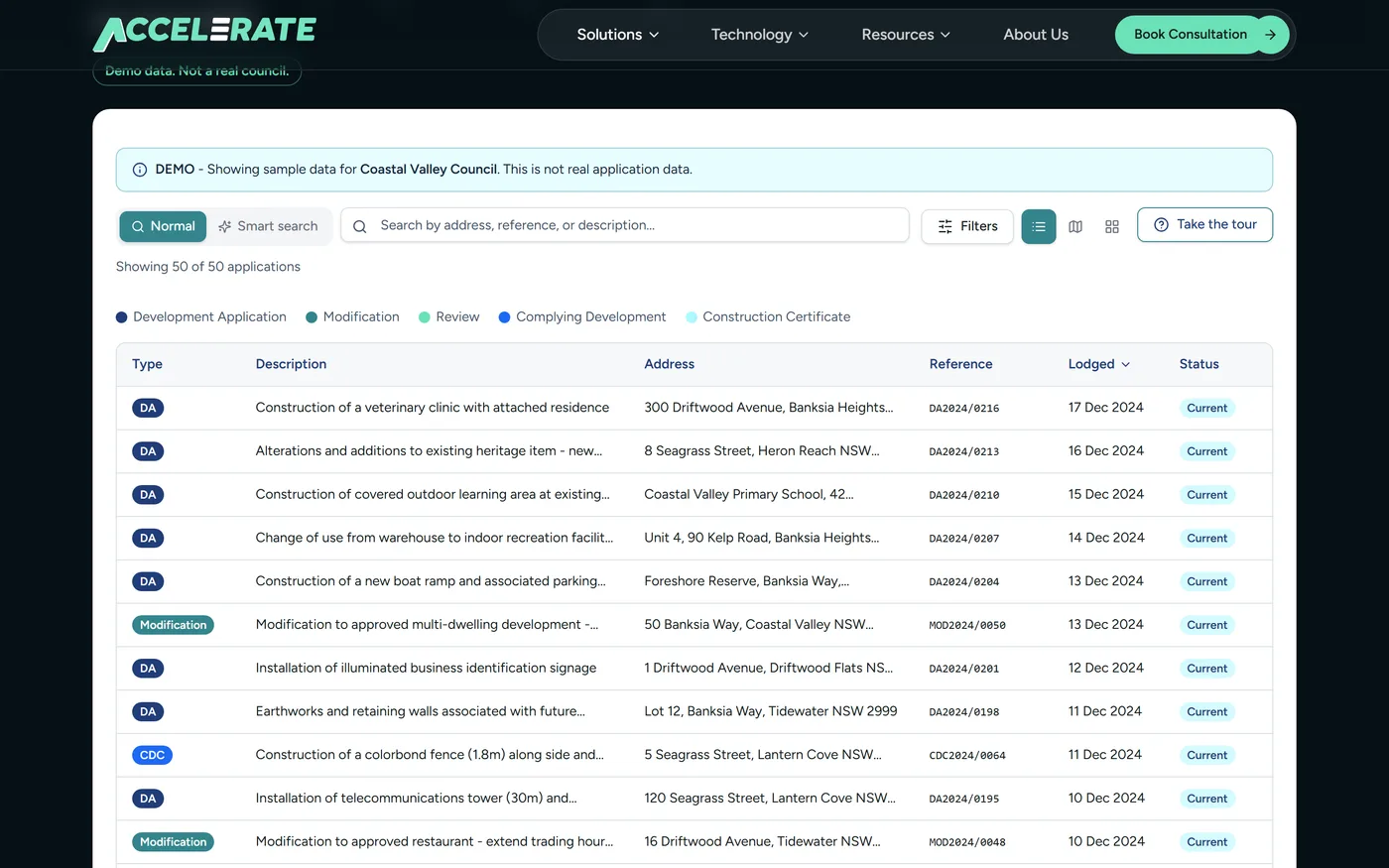
An integration runs in the background. Residents and staff see the websites and screens that use its data. One example is an application tracker on the council website, where a resident can look up an application by address or reference number and see its status. The tracker reads from the council’s core system, so staff do not maintain a second list.
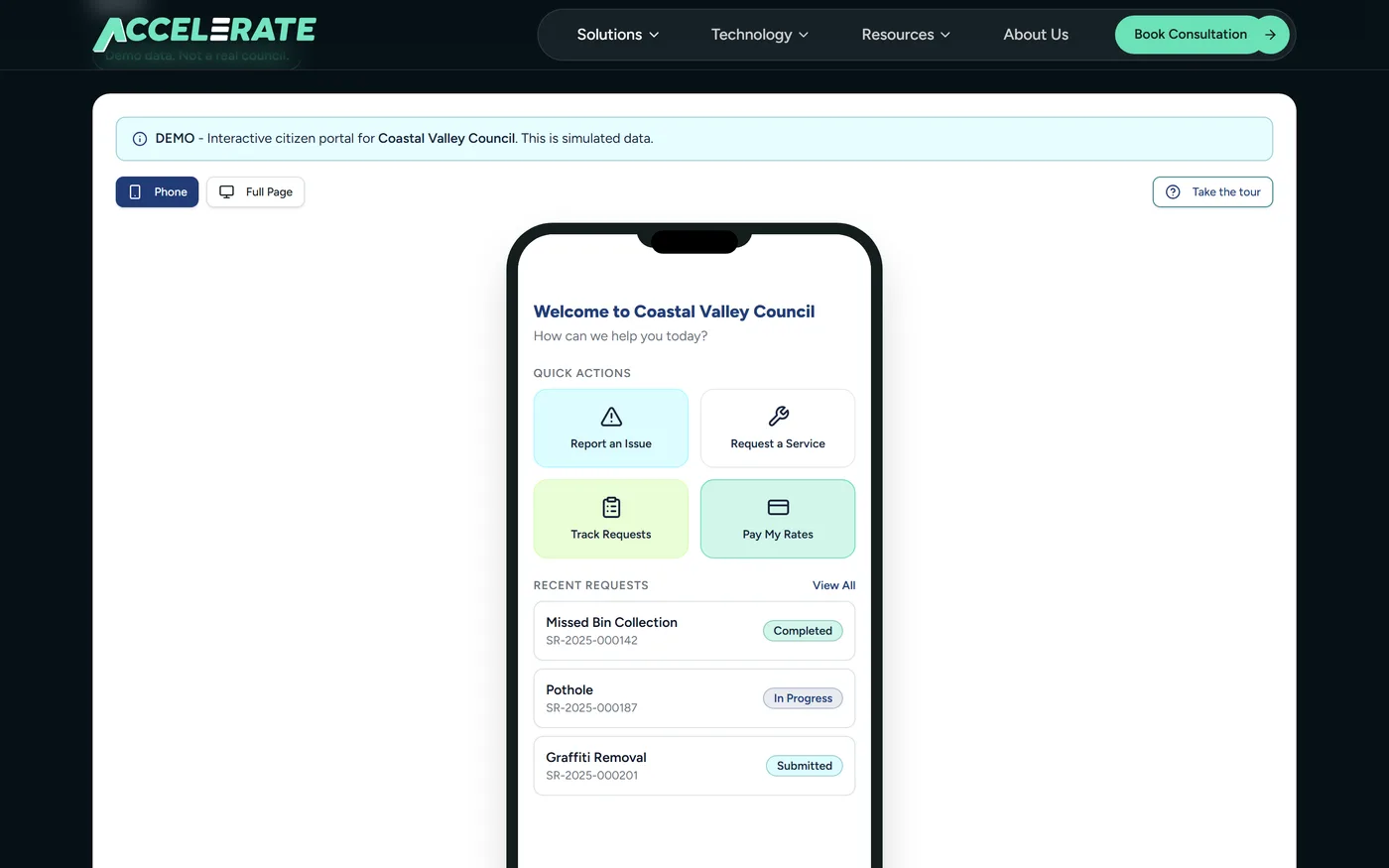
A citizen portal works the same way for service requests and rates. A resident can report a missed bin collection or pay a rates notice on a phone, and the request or payment is recorded in the system that council staff already use.
We have published more detail on each part of this work:
- NSW Planning Portal integration, and an integration guide for council IT teams
- Local government integration for rates, records and service requests
- A case study from Cowra Shire Council
Replacement and integration compared
| Replace the core system | Keep it and integrate | |
|---|---|---|
| Scope | All core functions, moved one module at a time | One process or one interface in each project |
| Who does the work | The vendor or an implementation partner | An integration team, using the interfaces the vendor supports |
| Effect on staff | Most staff learn a new system | Staff in the affected process change one step |
| Data | Historical data is migrated to the new system | Data stays where it is |
| Existing integrations | Rebuilt for the new system | Retested when the core system is upgraded |
| Main risk | Data migration, and running the old and new systems together during the changeover | The project can only use the interfaces the core system provides |
| Does not fix | A process that no team is responsible for | A core system that is unsupported or cannot meet a legal requirement |
We have not included prices, because they depend on the size of the council and the systems involved.
How to decide
The diagram puts the same reasoning into four questions.
Work through the questions in order and stop at the first yes.
- Question 1
Has the vendor ended support for your version, or is the system unable to meet a legal requirement?
YesReplace or upgrade the core systemIntegration will not solve this. Speak to the vendor or to an implementation partner for that product.
No, next question - Question 2
Is the problem inside the core system's own modules, such as rates, finance, payroll or assets?
YesReconfigure the core systemThe function usually exists and has not been configured. This is configuration work in the product you already have.
No, next question - Question 3
Do staff enter the same data into the core system and another system, or a state portal?
YesIntegrate the two systemsKeep both systems and automate the transfer. The calculator below estimates what the manual work costs now.
No, next question - Question 4
Is the gap in what residents can do online, such as lodging, tracking or paying?
YesAdd a portal, tracker or online formThe new front end reads from and writes to the core system, which stays in place.
No, next question - Review the process first
If you answered no to all four, the cause is probably in the process, for example a step that no team is responsible for. New software is unlikely to fix that.
Estimating the cost of manual data entry
Before you ask for quotes on an integration, work out what the manual process costs now. You need three numbers: how many items staff enter by hand each year, how long each one takes, and the hourly cost of the staff who do it.
Cost of manual data entry
Enter figures for one process, for example development applications copied from the NSW Planning Portal into the council system.
Applications, requests or certificates entered by hand.
Time to enter one item and check it.
Salary plus on-costs for the staff member.
The default of 800 items is the number of development applications Shellharbour City Council processes each year. The minutes and hourly cost are examples, so replace them with your own figures. A full-time role is counted as 1,820 hours a year. The result is the current cost of the manual work. An integration will not remove all of it, because staff still handle the items that need a decision or a correction.
For planning teams: a calculator with a time estimate for each application type
Compare the result with the quotes you receive. If the manual work costs a few thousand dollars a year, an integration is unlikely to pay for itself.
Questions to ask a supplier
These questions apply to any supplier, including us.
- Which of our systems have you integrated before, and did you use a vendor-supported API, file transfers or direct database access? A vendor-supported API is the least likely to break when the core system is upgraded.
- What happens when a transfer fails? Failed items should be queued and retried, and someone at the council should be notified.
- Who maintains the integration after go-live, and how do you charge for changes when the NSW Planning Portal APIs are updated?
- Where is our data stored, and in whose cloud tenancy?
- Can you show the product working with demonstration data?
- Which councils can we contact for a reference?
- Which tasks will staff still do by hand after the project?
- For a replacement, does the quote include rebuilding our existing integrations?
Frequently asked questions
What software do Australian councils use?
Most councils run a core system for rates, property, finance and regulatory work. TechnologyOne, Civica Authority and Infor Pathway are common. Councils also run a records system such as OpenText Content Manager or SharePoint and a website with online forms, and NSW councils use the state’s Planning Portal for development applications.
Should a council replace its core system or integrate with it?
Replace the core system if the vendor has ended support, if it cannot meet a legal requirement, or if the council is running two core systems after an amalgamation. Keep it and integrate if it works correctly but staff enter the same data into more than one system, or residents cannot see the status of an application or request online.
Do NSW councils have to integrate with the NSW Planning Portal?
No. Councils have had to use the portal since 1 July 2021, but integration with council systems is optional. A council without an integration enters each application into its own system by hand. In 2022 the NSW Government offered each council an $80,000 grant to build the integration, and 120 of the 128 councils applied.
How much does council software integration cost?
The cost depends on the systems involved and the number of processes, so we quote after discovery. To judge whether a project is worthwhile, first estimate what the manual work costs now: the number of items per year, multiplied by the minutes each one takes and the hourly cost of the staff who do it.
Can TechnologyOne, Civica Authority or Infor Pathway be integrated without replacing them?
Yes. We connect all three to Azure and Power Platform using the interfaces each vendor supports. The core system stays in place.
Next steps
The Local Government Hub lists the integrations and products described in this guide, and most of them have a demo you can try. If your council runs TechnologyOne Property & Rating and the backlog is configuration work, see TechnologyOne consulting.
Related resources
Accelerate Tech named a finalist for the 2026 Microsoft Inclusion Changemaker Partner of the Year Award
Accelerate Tech has been named a finalist for the 2026 Microsoft Inclusion Changemaker Partner of the Year Award. Our nomination was led by Language+, built for Multicultural NSW and the NSW Police Force.
AI automation for business and government
Most AI projects describe a tool. This describes what happens to the work itself: which tasks move to a system, which stay with a person, and the new work nobody budgets for.
What Is a Forward Deployed Engineer, and Why Is Every AI Company Hiring One?
The title came from Palantir and is now on job boards at every AI company. What a forward deployed engineer actually does, why AI work made the model mainstream, and the six questions to ask a provider.
Got a project in mind?
Book a free 30-minute consultation. We'll listen and give you a straight answer.
Book a Consultation